DALI
Yes
Basically, the same commands are used for DALI and DALI-2, so DALI-2 devices can be used in conventional systems without any problems.
Everything is allowed except a ring.
Max. 300 m with a cross section of 1.5 mm²
A maximum of 16 groups are possible in a DALI line.
64 DALI operating devices are permitted in a DALI circuit.
DALI operating devices can e.g. B. LED drivers with an integrated DALI interface.
A scene defines a specific state for each operating device (dimming value, colour temperature, colour depending on the device type).
A group is a combination of several operating devices that are controlled together via the group address.
Broadcast are simple telegrams that distribute the command equally to all participants.
DALI-2 is a new standard available since November 2014. DALI-2 is intended to eliminate ambiguities in the existing standard and ensure better interoperability between devices from different manufacturers.
DALI stands for Digital Addressable Lighting Interface and means that DALI lights can be addressed and controlled individually.
Single master means that in a DALI system there is only one master that sends the commands to the slaves (operating devices). Multimaster means that active communication is permitted for several participants on one line. Something like this will e.g. B. needed for buttons, motion detectors, smartphones or similar.
Max. 2mA.
The DALI standard states that the voltage range must be between 9.5 and 22 volts.
The simplest DALI system consists of a DALI bus supply, a DALI operating device, for example an LED driver.
DSZ16D-3x100A MID
Yes, it is possible to connect 1, 2 or 3 outer conductors.
Yes, it is possible to reset the meter readings for total and tariff values.
Yes, the display can be activated twice within 14 days, even without a power supply.
Accuracy class B (1%), inrush current 40 mA per path, standby power consumption 0.8 W per path.
Per PIN-Schutz. Eine Rücksetzung auf Werkseinstellungen (PIN, S0, Modbus) ist ebenfalls möglich.
Yes, the device complies with the MID (EU Measuring Instruments Directive) and is therefore approved for billing purposes.
Yes, the DSZ16D-3x100A MID is MID-compliant (EU Measuring Instruments Directive) and is therefore approved for billing purposes.
For all applications where MID-compliant billing to third parties is required – e.g. tenant electricity, charging infrastructure, commercial sub-meters or public facilities.
Modbus RTU via RS485 (addresses 1–247, baud rate 300–115,200, factory setting: 9600, parity None, stop bits 1) and an S0 output (0.01–10,000 pulses/kWh, factory setting: 1,000 pulses/kWh, pulse width 2–99 ms, factory setting: 30 ms).
Maximum current 100 A, reference current 10 A. Direct measurement; no external transformer required.
Zählerstand, Spannungen (L1-N, L2-N, L3-N, L1-L2, L2-L3, L3-L1), Ströme (L1, L2, L3, N), Wirkleistung je Phase sowie gesamt, Frequenz, Gesamtbezug sowie je Phase und aktueller Tarif (T1–T4).
DSZ16DE-3x100A
Yes, it is possible to connect 1, 2 or 3 outer conductors.
Yes, it is possible to reset the meter readings for total and tariff values.
Yes, the display can be activated twice within 14 days, even without a power supply.
Accuracy class B (1%), inrush current 40 mA per path, standby power consumption 0.8 W per path.
Per PIN-Schutz. Eine Rücksetzung auf Werkseinstellungen (PIN, S0, Modbus) ist ebenfalls möglich.
Für Energiemonitoring und Betriebsdatenerfassung ohne Abrechnungsrelevanz, z. B. zur internen Verbrauchsüberwachung. Er ist nicht für die Abrechnung gegenüber Dritten zugelassen.
Modbus RTU via RS485 (addresses 1–247, baud rate 300–115,200, factory setting: 9600, parity None, stop bits 1) and an S0 output (0.01–10,000 pulses/kWh, factory setting: 1,000 pulses/kWh, pulse width 2–99 ms, factory setting: 30 ms).
Spannung, Strom, Wirkleistung, Scheinleistung, Blindleistung, Leistungsfaktor und Frequenz. Er erfasst 4 Tarifzähler sowie ein Gesamtzählwerk für Wirkenergie.
Maximum current 100 A, reference current 10 A. Direct measurement; no external transformer required.
Zählerstand, Spannungen (L1-N, L2-N, L3-N, L1-L2, L2-L3, L3-L1), Ströme (L1, L2, L3, N), Wirkleistung je Phase sowie gesamt, Frequenz, Gesamtbezug sowie je Phase und aktueller Tarif (T1–T4).
DSZ16DZ-3x100A MID
Yes, it is possible to connect 1, 2 or 3 outer conductors.
Yes, it is possible to reset meter readings for total and tariff-based values – for both consumption and supply.
Yes, the measurement direction can be reversed via the display or via Modbus.
Yes, the display can be activated twice within 14 days, even without a power supply.
Accuracy class B (1%), inrush current 40 mA per path, standby power consumption 0.8 W per path.
Per PIN-Schutz. Eine Rücksetzung auf Werkseinstellungen (PIN, S0, Modbus) ist ebenfalls möglich.
Yes, the device complies with the MID (EU Measuring Instruments Directive) and is therefore approved for billing purposes.
Yes, the DSZ16DZ-3x100A MID is MID-compliant (EU Measuring Instruments Directive) and is therefore approved for billing purposes.
For all applications requiring bidirectional metering and MID-compliant billing to third parties – e.g. tenant electricity models with PV feed-in or charging infrastructure with energy feed-back.
Modbus RTU via RS485 (addresses 1–247, baud rate 300–115200, factory setting: 9600, parity None, stop bits 1) as well as two S0 outputs – one for consumption (→) and one for supply (←), each 0.01–10,000 pulses/kWh, factory setting: 1,000 pulses/kWh.
Periods of negative energy flow (feed-back) are offset against periods of positive energy flow. This is important for systems with uneven loads that feed energy into the grid.
The device measures energy in both directions: energy drawn from the grid (→) and energy fed into the grid (←), e.g. from a solar panel system or a combined heat and power plant.
The device measures energy in both directions: energy drawn from the grid (→) and energy fed into the grid (←), e.g. from a solar panel system or a combined heat and power plant.
Maximum current 100 A, reference current 10 A. Direct measurement; no external transformer required.
Das Display wechselt automatisch alle 5 Sekunden zwischen Bezugs- (→) und Lieferungsanzeige (←). Angezeigt werden Spannungen (L1-N, L2-N, L3-N, L1-L2, L2-L3, L3-L1), Ströme (L1, L2, L3, N), Wirkleistung je Phase sowie gesamt, Frequenz, Gesamtbezug und Gesamtlieferung sowie aktueller Tarif (T1–T4).
DSZ16DZE-3x100A
Yes, it is possible to connect 1, 2 or 3 outer conductors.
Yes, it is possible to reset meter readings for total and tariff-based values – for both consumption and supply.
Yes, the measurement direction can be reversed via the display or via Modbus.
Yes, the display can be activated twice within 14 days, even without a power supply.
Accuracy class B (1%), inrush current 40 mA per path, standby power consumption 0.8 W per path.
Per PIN-Schutz. Eine Rücksetzung auf Werkseinstellungen (PIN, S0, Modbus) ist ebenfalls möglich.
For energy monitoring and operational data collection in systems that feed electricity into the grid, e.g. PV systems. As it does not have MID approval, it is suitable for internal monitoring and energy management, but not for billing third parties.
Modbus RTU via RS485 (addresses 1–247, baud rate 300–115200, factory setting: 9600, parity None, stop bits 1) as well as two S0 outputs – one for consumption (→) and one for supply (←), each 0.01–10,000 pulses/kWh, factory setting: 1,000 pulses/kWh.
Periods of negative energy flow (feed-back) are offset against periods of positive energy flow. This is important for systems with uneven loads that feed energy into the grid.
The device measures energy in both directions: energy drawn from the grid (→) and energy fed into the grid (←), e.g. from a solar panel system or a combined heat and power plant.
The device measures energy in both directions: energy drawn from the grid (→) and energy fed into the grid (←), e.g. from a solar panel system or a combined heat and power plant.
Maximum current 100 A, reference current 10 A. Direct measurement; no external transformer required.
Das Display wechselt automatisch alle 5 Sekunden zwischen Bezugs- (→) und Lieferungsanzeige (←). Angezeigt werden Spannungen (L1-N, L2-N, L3-N, L1-L2, L2-L3, L3-L1), Ströme (L1, L2, L3, N), Wirkleistung je Phase sowie gesamt, Frequenz, Gesamtbezug und Gesamtlieferung sowie aktueller Tarif (T1–T4).
DSZ16WD-3x5A MID
Yes, the DSZ16WD-3x5A MID is MID-compliant (EU Measuring Instruments Directive) and is therefore approved for billing purposes.
For installations with high connected loads where external current transformers are used – e.g. in industrial buildings or large properties. It is MID-compliant and therefore approved for billing third parties.
The meter is not connected directly to the circuit, but is instead connected to external current transformers. These step down high primary currents to a measurable secondary current (5 A or 1 A). This allows currents of up to approximately 1,500 A to be measured.
The meter is not connected directly to the circuit, but is instead connected to external current transformers. These step down high primary currents to a measurable secondary current (5 A or 1 A). This allows currents of up to approximately 1,500 A to be measured.
Maximum current 6 A, reference current 5 A – this is the secondary current of the connected transformer.
Maximum current 6 A, reference current 5 A – this is the secondary current of the connected transformer.
Adjustable from 5:5 to 1500:5 and from 5:1 to 1500:1 (factory setting: 5:5). Supported primary currents: 5, 50, 100, 150, 200, 250, 300, 400, 500, 600, 750, 1000, 1250, 1500 A.
Adjustable from 5:5 to 1500:5 and from 5:1 to 1500:1 (factory setting: 5:5). Supported primary currents: 5, 50, 100, 150, 200, 250, 300, 400, 500, 600, 750, 1000, 1250, 1500 A.
DSZ16WDZ-3x5A MID
Yes, the DSZ16WDZ-3x5A MID is MID-compliant (EU Measuring Instruments Directive) and is therefore approved for billing purposes.
For large-scale installations with high connected loads and grid feed-in, e.g. industrial buildings or properties with PV systems or CHP units, where MID-compliant billing to third parties is required.
Across all three paths, the sum of consumption and feed-in is calculated. Periods of feed-in are offset against consumption – ideal for systems with uneven load distribution and generation.
The device measures energy in both directions: energy drawn from the grid (→) and energy fed into the grid (←), e.g. from a solar panel system or a combined heat and power plant.
The meter is not connected directly to the circuit, but is instead connected to external current transformers. These step down high primary currents to a measurable secondary current (5 A or 1 A). This allows currents of up to approximately 1,500 A to be measured.
The meter is not connected directly to the circuit, but is instead connected to external current transformers. These step down high primary currents to a measurable secondary current (5 A or 1 A). This allows currents of up to approximately 1,500 A to be measured.
Maximum current 6 A, reference current 5 A – this is the secondary current of the connected transformer.
Maximum current 6 A, reference current 5 A – this is the secondary current of the connected transformer.
Adjustable from 5:5 to 1500:5 and from 5:1 to 1500:1 (factory setting: 5:5). Supported primary currents: 5, 50, 100, 150, 200, 250, 300, 400, 500, 600, 750, 1000, 1250, 1500 A.
Adjustable from 5:5 to 1500:5 and from 5:1 to 1500:1 (factory setting: 5:5). Supported primary currents: 5, 50, 100, 150, 200, 250, 300, 400, 500, 600, 750, 1000, 1250, 1500 A.
ESB62-IP
Let the ESB62-IP move from the bottom to the top to calibrate it automatically.
This is not yet possible.
Make sure that the switching outputs of the ESB62-IP are connected the right way up.
ESB64NP-IPM
Yes, this is possible in combination with an ELTAKO DCM12-UC.
Yes, GS4 mode must be activated in the ELTAKO Connect app and the slat function must be activated and configured .
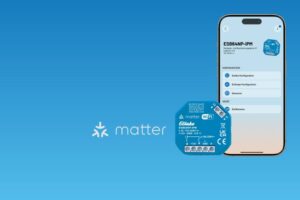
Yes, with the EnOcean Adapter EOA64, EnOcean sensors can be directly linked to the ESB64NP-IPM and forwarded to Matter.
Please make sure that the run time has been set correctly in the ELTAKO Connect app.
ESR62-IP
Yes, this is possible with the ESR62PF. The contact here is potential-free.
EUD12NPN-BT/600W-230V
Yes, the ELTAKO Connect app allows you to read out the configuration and transfer it to other devices.
The configuration can be conveniently carried out using the ELTAKO Connect app. Simply download the app from the store and connect it to the device.
The configuration can be conveniently carried out using the ELTAKO Connect app. Simply download the app from the store and connect it to the device.
A maximum of nine LUD12-230V modules can be operated with one EUD12NPN-BT/600W-230V. However, this depends on the wiring of the installation. Further information, including wiring diagrams, can be found in the operating instructions for the LUD12-230V.
The dimmer can handle a maximum load of 600 W. The load capacity can be increased using additional load modules. For this purpose, LUD12-230V load modules are required.
In addition to a pushbutton, a motion detector can also be connected to this input. This allows you to automatically switch the light on when movement is detected and off again after a set time.
The EUD12NPN-BT/600W-230V is a universal dimmer. It can dim conventional incandescent lamps, inductive loads (L-loads), and, of course, electronic loads such as LEDs and dimmable electronic ballasts.
EUD62-IP
EUD62NPN-IPM/110-240V
No, the Matter QR code can only be used for pairing in the first ecosystem, e.g. Apple Home. If another ecosystem is to be added, a new QR code or numeric code must be generated from the ecosystem that has already paired.
Yes, this is possible in principle. Parents can control the Matter device via the Apple Home app with an iPhone, for example, and children can control it via the Amazon Alexa app with an Android device.
No, Matter devices can be used without internet access.
After your Matter device has been powered, you have 15 minutes to complete the initial start-up.
You’ll then need to briefly unplug and reconnect the Matter device to pair the device.
Try resetting the device to factory settings. Please refer to the user manual of your Matter device.
To control a device via Matter, you’ll need a matching Matter controller.
Depending on the ecosystem, there are different Matter controllers, in the case of Apple Home, for example, this is a HomePod mini.
Products
Specialist companies can purchase Eltako products from electrical wholesalers. As an end user, please contact your trusted electrician.
Series 62-IP
Make sure you are on the correct WLAN.
The Eltako Connect app can communicate directly with the series 62-IP via WLAN. However, we recommend using a WLAN router/access point; this is mandatory for Apple HomeKit, for example.
Yes, Apple Home is required. The Eltako Connect app is only used for configuration. In addition, control via REST API is possible.
Make sure the device is connected to the internet. If you are sure that the update has been released for more than 12 hours, the device should have already downloaded the update. Make sure the product is in an inactive state (e.g. relay output off) for a few seconds so that it can restart.
The series 64 will also have an EnOcean radio module.
Check your WLAN settings. Communication between devices may be prohibited in your WLAN. This is often the case, for example, in guest WLANs.
Check your WLAN settings. Communication between devices may be prohibited in your WLAN. This is often the case, for example, in guest WLANs.
Series 64
Via the ELTAKO Connect app.
No, each button can be configured separately. For example, the upper button can directly control the actuator without Matter, while the lower button is forwarded to Matter.
Yes, the series 64 acts as a Matter gateway and can, in addition to its core functions such as switching or dimming, forward wired button inputs and learned EnOcean wireless switches to Matter.
Currently, up to 30 EnOcean wireless switches are supported.
Service
At Downloads you will find a selection of engraving templates. You can also order individual engravings.
Smart Home
A smart home typically consists of several elements. These include actuators such as radiator controllers, lamps, shutters, blinds and ventilation systems, which can be easily integrated into a smart home.
Input devices so that even a short click on a switch is enough or, of course, tapping on the smartphone. Essential functions in the room, such as switching lights on and off, are always available in the form of a button on the wall.
In addition, sensors which are required, for example, to measure room temperatures or the weather and give a signal as to whether doors and windows are open or closed. In combination with a Smart Home control panel (Eltako Safe, wibutler, mediola), these two components form the heart of a Smart Home.
Last but not least, the networking, which brings all the strands of the system together to form the safe, so that all the components can talk to each other and be controlled.
New buildings and core-renovated old buildings should be economical, sustainable, energy-efficient, comfortable and usable in the long term.
We try to cover this demand with our products and solutions. It is important for us that they interact intelligently, intuitively and safely.
The goal is for your smart home to think like you, know about your needs, and act in accordance with season, weather, presence, and lifestyle.
Over 1001 possibilities, such as the right lighting mood for the atmosphere.
We create for you a comfortable lifestyle without equal.
SU62PF-BT/UC
Yes, with a connected push button, the contact can be switched on and off at any time. The switching programs are not affected by this.
The device has a reserve power of approximately 7 days. During this period, the time does not need to be reset. The configuration is, of course, permanently saved.
The SU62PF-BT/UC can be conveniently configured using the ELTAKO Connect app. The app is available for download in the App Store for both Android and Apple devices.
The device has a 10A / 230V contact and can control loads such as incandescent lamps up to 2000W and LED lights up to a maximum of 200W.
The SU62PF-BT/UC can operate with 12-230V AC or DC.
Surge protection device
As a rule, yes. The most common damage is caused by conducted power surges. So if the line is interrupted, by pulling the plug, the interference cannot penetrate the end device.
However, you have to consistently pull all plugs, e.g. power and antenna plugs on a TV.
However, this is not a permanent method of protection, because thunderstorms will certainly occur at night or in the absence of the residents.
And last but not least: In the event of a direct or nearby lightning strike, serious damage to and in the building must be expected in buildings without protective measures.
All about Type 3 Surge Protectors
These surge protection devices (type 3 surge protection device) used to be referred to as fine protection. It is important to know that these are usually used in third place as part of a graduated protection concept. Their scope of protection is thus limited, although a little protection is of course better than none at all.
They are available in different versions, e.g. electricity and telephone line combined.
These protective devices are available in different designs, e.g. as sockets. These devices are often in use in offices. Devices that are plugged directly into an existing socket (such as a timer) are also common. Anyone can insert these devices into a socket themselves and connect the device to be protected to it. Obvious cheap products must be strongly discouraged: These devices often do not meet the strict VDE guidelines and thus do not achieve the desired protection goal. Fire development was also reported in the event of improper use.
Consumers should therefore purchase protective devices from specialist retailers and use products from well-known manufacturers that guarantee compliance with the DIN EN 61643-11 standard.
Type 3 surge arresters are available from about 30 euros per device.
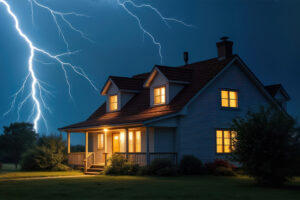
Yes. It is typical that lightning strikes somewhere and the lightning current looks for all possible paths towards “earth”. Some of it often flows into the electricity and telephone network and damages the surrounding connected devices. There are investigations according to which telephone systems were damaged by a lightning strike even 3 km away.
In principle, there are two possibilities:
- via a strong electromagnetic field, e.g. in the event of a direct lightning strike. This is actually only important for very sensitive electronic devices; corresponding (EMC) protection measures are mainly used in industry.
- via metal cables.
This concerns conducted interference, meaning that ALL lines entering a building must be considered: electricity, telephone, broadband, water, etc. These lines must be connected to the central “ground” (main equipotential bonding) at the building’s entry point. Live conductors carrying voltage (telephone, electricity, broadband cable, etc.) must be equipped with surge protection devices. These protective devices create a brief short circuit to ground for surges.
Not all overvoltages are the same. It is clear that in the vicinity of a direct lightning strike, much higher surges occur than in the distance. In addition to the overvoltage, lightning currents can also flow on a line.
In the case of (conducted) disturbances, a distinction must be made between high-energy disturbances, e.g. due to a direct or nearby lightning strike, and low-energy disturbances, e.g. distant lightning strikes or switchovers in the power grid. A distinction must also be made between the devices to be protected: There are electrical and electronic devices that are inherently more sensitive, such as computers, televisions, telephone systems.
Therefore, the three-stage protection concept with SPD Surge Protective Device (SPD) applies in general:
- So-called lightning arresters (SPD type 1) protect against high-energy disturbances and high overvoltages. These prevent the penetration of lightning (partial) currents into the building via the cable to be protected. However, overvoltages still occur.
- Surge arresters are used against overvoltages (SPD type 2). These reduce the interference voltage to a generally sufficiently low level.
- For particularly sensitive devices, special surge arresters (SPD Type 3) are used, which reduce the interference voltage even further.
Lightning currents are always used when lightning strikes directly into or near the building. After the impact, lightning currents seek all possible paths towards the earth; they also typically spread into the earth via metal pipes. It is known from analyses of damage reports that damage to electrical equipment that is connected to the electricity or telephone network, for example, can occur up to 3 km away from the actual lightning strike.
The special feature of lightning currents is the high energy content: If the current is high enough, i.e.
in the vicinity of the impact site, fire can develop in the presence of flammable material and oxygen. Overvoltages, on the other hand, are different: the currents that occur are low, as is the energy.
Sensitive electrical and electronic equipment is disrupted or destroyed; however, there is usually no fire development.
The task of a lightning protection system is to protect a building and the people in it from lightning effects. In addition, a modern lightning protection system also protects the technology from overvoltages. It consists of
- External lightning protection
External lightning protection protects a building by the arresting devices absorbing direct lightning strikes and introducing the lightning current via the conductors (not to be confused with lightning arresters) into the earthing system in the ground. External lightning protection does not prevent the lightning from hitting the building, but offers the lightning a metal connection at the preferred points of impact, which is able to transport the lightning current towards the earth permanently and without danger to people and the object to be protected. This prevents direct lightning strikes into people. - Internal lightning protection
An essential component is lightning protection equipotential bonding. All metal pipe installations and all cable installations (electricity, DSL, cable TV, SATTV, etc.) are connected to each other and to the main grounding rail, if necessary with SPDs type 1. This prevents voltage differences and the associated lightning flashovers in the building with subsequent fire and personal hazard. This lightning protection equipotential bonding goes beyond protective equipotential bonding according to DIN VDE 0100-410 and DIN VDE 0100-540 (surge protection). - Überspannungsschutz
Wenn der Innere Blitzschutz auch einen Schutz der Kabel-Installationen und der daran
angeschlossenen Geräte übernehmen soll, spricht man vom Überspannungsschutz. Durch
Überspannungsschutzgeräte (SPDs Typ 2) in den Verteilern für die Energietechnik und den
Übergabe- und/oder Speisepunkten der informationstechnischen Systeme wird die
auftretende Überspannung auf ein für die Endgeräte ungefährliche Werte begrenzt. Bei
Leitungslängen größer etwa 5 m sind weitere Ableiter (SPDs Typ 3) unmittelbar am
Endgerät für einen vollständigen Schutz erforderlich.
Surge protection can therefore be seen as part of lightning protection, but it can also be set up independently as basic protection for electrical installations and personal protection.
Surges, on the other hand, are different: the currents involved are low, as is the energy. Sensitive electrical and electronic equipment may be disrupted or destroyed; however, fires generally do not occur.
The overvoltage damages or destroys the connected electronic components. In extreme cases, the destructive effect can even cause explosion and fire of the device.
In addition, the installations as a whole are at risk: In the event of very high overvoltages, a short circuit takes place in the cables and distributors; the insulation is destroyed, and a fire may occur. In any case, the system is defective and must be repaired at great expense.
In the home power grid, the mains voltage is usually 230 V. Higher voltages can occur due to switching operations by the electricity suppliers or in the event of nearby lightning strikes, which cause damage to sensitive electrical and electronic equipment.
Whether and what damage occurs depends not only on the amount of the overvoltage, but also on the duration as well as on the “curve shape” (e.g. steep voltage increase). Overvoltages due to nearby lightning strikes are particularly dangerous, because lightning (partial) currents enter the house via the power supply network and can cause considerable damage there.
The difference between surge protection and lightning protection is that a high voltage is assumed to be the primary cause of damage in surge protection, while a high current is assumed to be the primary cause of damage in lightning protection.
Surge protection has been considered a necessary part of the electrical system in Germany since December 2018 (for planning since October 2016) – see the following article.
Since then, it has had to be installed in new buildings. For older buildings, surge protection is not mandatory. Nevertheless, it is highly advisable to have a
Surge protection. This is because today’s households use a large number of high-quality electrical devices that are connected to the power grid, such as televisions, stoves, routers/telephone systems.
Almost all devices contain electronics that can easily break in the event of overvoltages.
In conventional residential buildings, the installation of a lightning protection system is not mandatory. Then it is the choice of the owner.
- For many, the worst event is a collision. These people attach importance to airbags. They may even allow more airbags to be installed than are provided for as standard.
- Another group of people has problems with parking and is therefore calling for an extended parking aid with sensors and camera.
The user can use the various protective devices and combine them with each other. The same applies to lightning protection:
- A person is terribly afraid of the consequences of a direct lightning strike (fire, explosion); this is where external lightning protection helps.
- Another person has a high-quality hi-fi system or has spent many hours installing special computer programs – in this case, internal lightning protection including surge protection is advisable.
- Others want all-round protection. This is achieved by a lightning protection system consisting of the outer lightning protection and the inner lightning protection including surge protection.
- In any case, surge protection should be installed – this is mandatory for new buildings in Germany from October 2016.
These considerations apply to both homeowners and tenants, although the scope of influence for a tenant is naturally limited. They can only implement measures that are possible within their own living space.
Who carries out the installation? How much does it cost?
In the power grid, lightning arresters (SPD type 1) are usually used in the main distribution (meter cabinet). This means that the entire downstream system is roughly protected.
Surge arresters (SPD type 2) are also installed in the electrical distribution cabinet. Modern combination arresters are often used in which lightning current and surge arresters are already integrated. These cost approximately. 800 euros, a surge protector alone is for about 250 euros. SPDs Type 1 and Type 2 are installed by a qualified electrician.
Special surge arresters for sensitive electronic devices (SPD type 3) are usually devices that are plugged into a socket (socket with earthing connection); see question below.
In principle, anyone can buy and install these protective devices.
If all metal cables are grounded, namely at the entrance to the building, no overvoltage can enter the house. However, the power line, which is energised, cannot simply be “grounded” because then a short circuit is created and the mains voltage in the building collapses. For these “active” conductors, there are surge protection devices that perform short-term grounding in the event of an overvoltage and otherwise allow the line to operate properly.
By the way, this connection of all metal cables with each other and with the earth is called lightning protection equipotential bonding.
Technical information
Operating instructions and technical information can be found on the respective product page, as well as in the “Download” section.
You are also welcome to download our catalogue or order it home free of charge.
Your general contact for Eltako products is the technical service hotline.
They will provide you with expert assistance in proper planning, installation and in the event of malfunctions.
If you have any questions specifically about Professional Smart Home products, further contacts are available.
WMS
Up to 64 MSR12-UC, FWG14MS or FWS61-24V DC evaluation units can be connected to the weather data multisensor in order to evaluate a WMS multiple times.
With the MSR12-UC, switching commands can be generated directly via threshold values. This allows shading systems, for example, to be controlled with our EGS12 and EGS61 group switches. It can also be used for other applications, such as outdoor lighting controlled by the twilight.
With the FWG14MS or FWS61-24C DC, the data can be transmitted directly to actuators from the series 14 and 71. The weather data for shading control, for example, is then taken into account in the actuators depending on the application. For more complex solutions, the weather data can be visualised in controllers and linked to logics.
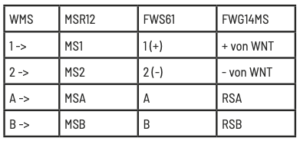
You can find the installation instructions in our instruction manual.
A power supply unit WNT15- 24VDC/24W or WNT61-24VDC/10W is required for the power supply including heating of the rain sensor
The connection is made using standard telephone cable (J-Y(ST)Y 2 × 2 × 0.8)
The weather station records brightness from three directions (0…99,000 lux), wind (0…35 m/s), rain and temperature (-40…+80°C)
ZGW16WL-IP
Yes, the electricity meter values can also be forwarded or integrated via REST-API or MQTT.
Yes, several ZGW16WL-IP can also be used in the ELTAKO Connect app.
The data can be displayed via the ELTAKO Connect app or the web interface of the ZGW16WL-IP.
The data is stored on the ZGW16WL-IP for up to three years.
Only ELTAKO Modbus power meters, such as the DSZ15DZMOD, can be used.